Overtime Live
OVERTIMELIVE
UK Shift Workers · 2026

Best Way to Track Shifts & Overtime Pay: The Simplest, Compared

We make one of these, so we’ll be upfront. But “best” depends on how much setup you’ll actually tolerate before a tool tells you anything useful. Here’s an honest comparison of the five ways UK shift workers really track their hours and pay — and who each one suits.

The short version

Overtime Live is the quickest to get value from — enter your rate, press start, and watch the money add up. A spreadsheet is free and flexible but only tells you anything after you’ve filled it in.

Generic timesheet apps are built for billing clients, not for shift patterns and overtime multipliers. Your employer’s rota system knows when you work but not what you earn. And a paper diary is the most reliable thing on this list right up until you need a total.

Setup Effort

What each one needs before it’s useful

The honest axis isn’t features — it’s how much work you do before the tool does any. And whether it can tell you what you’ve earned while you’re still on shift.

Option What it needs to start Setup Shows live earnings mid-shift
Overtime Live Your hourly rate 1 input, no account Yes — ticking up, including on the Lock Screen
Paper diary or notes app A pen, or the app you already have None No — and no arithmetic either
Spreadsheet template A template, plus your rates and multipliers as formulas Formula setup, then manual entry after every shift No — it totals the past
Generic timesheet app Account, workspace, and a project or client to log against Account + project structure Tracks time; pay rules usually need a paid tier
Employer rota system Nothing — your employer already runs it None — but you don’t control it either No — it shows shifts, not your pay

Timesheet-app tiers and rota-system features vary by vendor and employer. Check yours before relying on this — and see the named app-by-app comparison if you’re choosing between specific products.

Who Each Suits

Best for — and not for you if

There is no single winner here. Three of these are genuinely the right answer for somebody.

Overtime Live

The live earnings one

Best for: shift workers who want to see what a shift is actually worth while they’re working it, with overtime multipliers handled automatically.

Not for you if: you need your history backed up to the cloud or synced across devices, or your manager needs to see it. Everything stays on your phone — change handset without exporting and the record doesn’t follow you. There’s no team view and no payroll integration.

Paper diary / notes app

The one that never breaks

Best for: anyone who just needs a dated note of what they worked, and trusts paper more than software. It is the most durable evidence on this list in a payslip dispute.

Not for you if: you want a total without doing the maths yourself, or you work varied rates and multipliers where the arithmetic is the hard part.

Spreadsheet template

The one you already half-built

Best for: people who like owning their data outright, want custom columns, and are disciplined about filling it in. Free, exportable, and yours forever.

Not for you if: you’ve ever let it slide for three weeks and then tried to reconstruct a month from memory — which is the normal outcome, not a personal failing.

Generic timesheet app

The one built for someone else

Best for: freelancers and consultants billing hours to clients or projects, where the output is an invoice.

Not for you if: your work is rota-shaped — recurring patterns, unsocial hours, time and a third, night rates. You’ll spend the setup modelling shifts as “projects”.

Employer rota system

The one you don’t control

Best for: checking what you were rostered for, swapping shifts, and cross-referencing against a payslip.

Not for you if: you want an independent record. You can’t edit it, you may lose access when you leave, and it rarely shows your rate — which is exactly the number in dispute when a payslip is wrong.

Try the simplest one

One input, then it just runs

Enter your hourly rate and press start — your pay ticks up live, overtime multipliers included, on your Lock Screen. No account, nothing to configure.

Free · No account · Works offline

★★★★★
This is a great tool to track overtime across a variety of shifts. It’s got a really handy clock feature on your lock screen as well as some features like splitting a shift if you earn different rates throughout a shift.
cfc90 · App Store
★★★★★
Easy to use, intelligent and clean. Has taken the pain out of my least favourite task beforehand!
Ste McCormick · App Store
★★★★★
Probably the easiest time I’ve had putting my shift rotation in.
r/nursing · View thread →
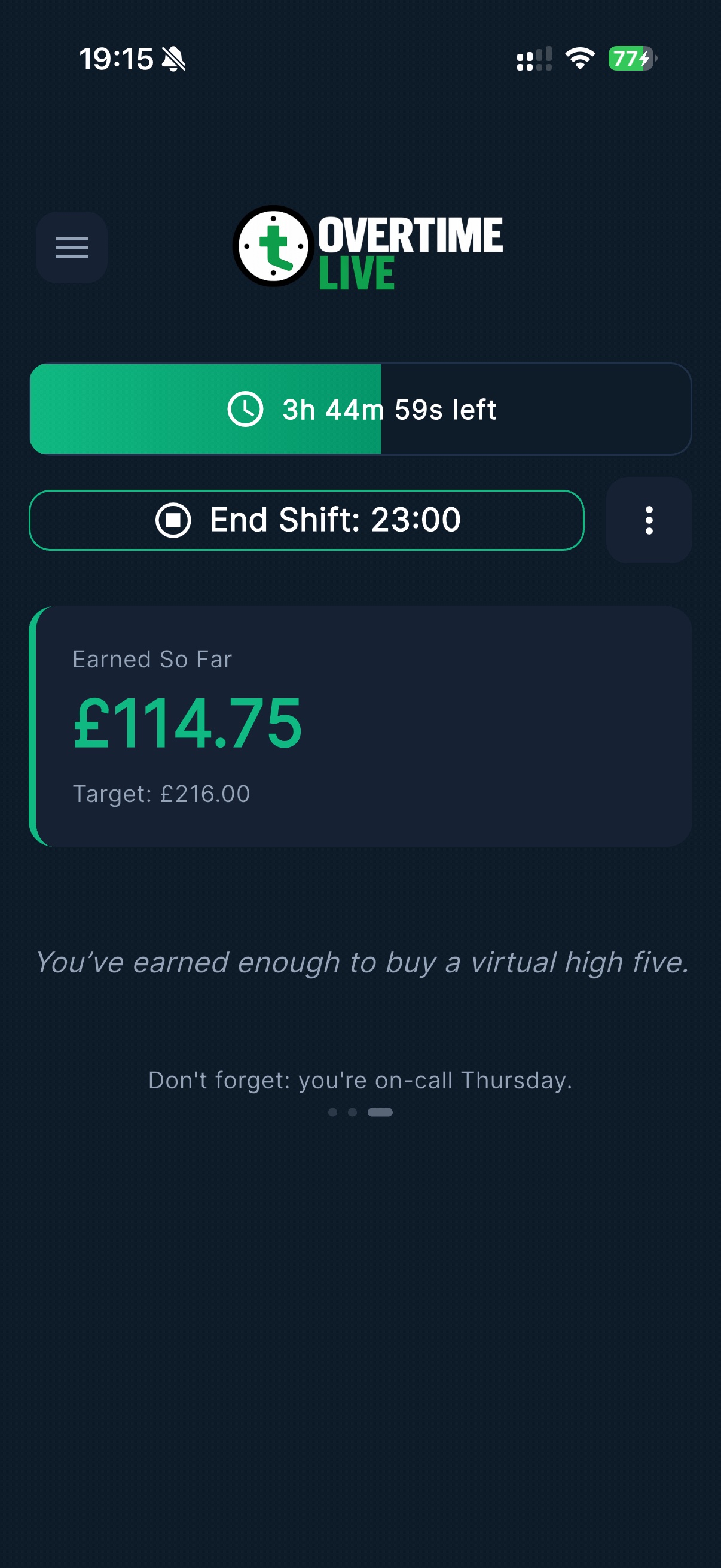
Overtime Live during a shift in progress, showing £114.75 earned so far against a £216.00 target with 3h 44m remaining
A shift in progress: £114.75 of a £216 target, updating every second.
FAQ

Common questions

What is the simplest way to track shifts and overtime in the UK?
Overtime Live is the simplest of the five options here: enter your hourly rate and press start, with no account and no rota import. A spreadsheet template is free but needs formulas set up before it calculates anything, and a generic timesheet app needs an account and a project structure before it tracks a single hour. A paper diary needs no setup at all — but does no arithmetic for you.
Is a spreadsheet good enough for tracking overtime?
If you already have one that works and you only need a monthly total, yes — genuinely. It’s free, it’s yours, and it exports anywhere. What it can’t do is tell you what you’ve earned mid-shift, and it depends on you filling it in after every shift, which is where most overtime records fall apart. If you’re already disciplined about it, there’s no strong reason to switch.
Can I just use my employer’s rota system to track overtime pay?
It shows the shifts you were rostered for, but it’s built for scheduling rather than for showing you your pay. It usually won’t show your hourly rate, your overtime multiplier or your running earnings, and you can’t change what it records. Treat it as a cross-reference when checking a payslip, not as a personal pay record — which is the case for keeping an independent one alongside it. Our guide on disputing a payslip error covers what evidence actually helps.
Which shift tracker shows live earnings during a shift?
Of the options compared here, only Overtime Live shows earnings accumulating in real time during a shift, including on the iPhone Lock Screen via iOS Live Activities. Spreadsheets, timesheet apps and employer rota systems all record hours after the fact and calculate pay later, if at all.
Do I need an account to use Overtime Live?
No — no account, no sign-up, no email verification, and shift data stays on your device rather than being uploaded to a server. The trade-off is real: there’s no cloud backup and no sync between devices, so if you change phone without exporting first, the history doesn’t follow you.