



Know Your Take-Home Pay
Before Payday
Your payslip shouldn't be a surprise. Overtime Live's Income Tools show you your estimated net pay mid-shift, track exactly what you've earned this pay period, and handle the tax maths so you don't have to.
- See estimated take-home pay in real time — the net card updates every second alongside your gross earnings while you track a shift
- Pay Period Tracker shows weekly, bi-weekly, or monthly totals — anchored to a real pay date, not a generic calendar month
- Region presets for UK, US, Canada, Germany — or customise your own tax brackets, NI rate, and pension contribution
- All four Income Tools work on iOS and Android — free, no account required
The problem with payslip surprises
Most shift workers have been there. A long run of overtime, extra nights, a bank holiday or two. You think you've had a decent run. Then the payslip lands and the number is lower than expected — taxes, NI, pension — and you can't quite work out whether it's right or not.
That gap between what you earn gross and what you actually take home is one of the most frustrating parts of shift work. It's not just about the money. It's the uncertainty. You make decisions — about bills, about covering shifts, about saying yes to overtime — based on a rough guess that turns out to be wrong.
The Income Tools in Overtime Live are built to close that gap. Not with a generic calculator you fill in once and forget, but with live estimates tied to the actual shifts you're working.
Pay Period Tracker
Most apps show you a running total of everything you've ever earned. That's useful, but it's not what you need when you're trying to figure out how this fortnight is going.
The Pay Period Tracker shows your earnings, hours worked, and shift count for the current pay period only — the window that ends when your next paycheque lands. It appears as a card on your History screen, so it's right there every time you check back on your shifts.
How to set it up
Turn on the Pay Period Tracker toggle in Settings, then set two things:
- Pay frequency — weekly, bi-weekly (every two weeks), or monthly
- Period start — pick any real date that a pay period started
That's it. The app works backwards and forwards from that anchor date to calculate every pay period, past and future. You don't need to update it every cycle — set it once and it stays accurate automatically.
What it shows. Your current pay period card displays: total earned so far this period, total hours, number of shifts, a progress bar through the period, and days remaining until the period ends.
For NHS staff paid monthly, or police and security workers on bi-weekly pay, this makes it very easy to see whether this period is tracking above or below what you'd expect — before the payslip arrives.
Tax & Take-Home Estimator
This is where Overtime Live gets genuinely useful for anyone trying to understand their real earnings. The Tax & Take-Home Estimator takes your actual shift history, projects an annual gross figure, and estimates your income tax, social contributions, and pension deductions based on real tax rules.
You access it through Settings > Income Tools > Tax & Take-Home Estimator, and the first thing you do is pick your region.
| Region preset | Personal allowance | Social / NI rate | Tax bands |
|---|---|---|---|
| 🇬🇧United Kingdom | £12,570 | 8% NI | 20% / 40% / 45% |
| 🇺🇸United States | $14,600 | 7.65% FICA | 10%–37% (7 bands) |
| 🇨🇦Canada | $16,500 | 7.6% | 14%–33% (5 bands) |
| 🇩🇪Germany | €12,348 | 20% social | 25% / 42% / 45% |
| ⚙️Simple 25% | None | None | Flat 25% |
On top of the regional preset, you can adjust the pension contribution rate — defaulting to 5%, which matches a standard NHS or public sector workplace pension. Change it to match your actual scheme and the estimate gets sharper.
For NHS staff. The UK preset uses the exact current PAYE income tax brackets and the standard personal allowance. Set your pension rate to your actual NHS pension tier and the estimate reflects what you'd expect to see on an AfC payslip — without being a guarantee. It's a solid working estimate, not an accountant's calculation.
Worth knowing. The estimator doesn't account for student loan repayments, childcare vouchers, salary sacrifice arrangements, or any other specific deductions your employer applies. Treat it as a strong estimate, not an exact figure. For the official number, your payroll department or HMRC's own calculator is the right tool.
Live take-home pay while you work
This is the part that makes the Income Tools feel genuinely different from any other tracker. With Show Take-Home Pay turned on in Settings, a second card appears on the home screen during every active shift — right below your gross earnings counter.
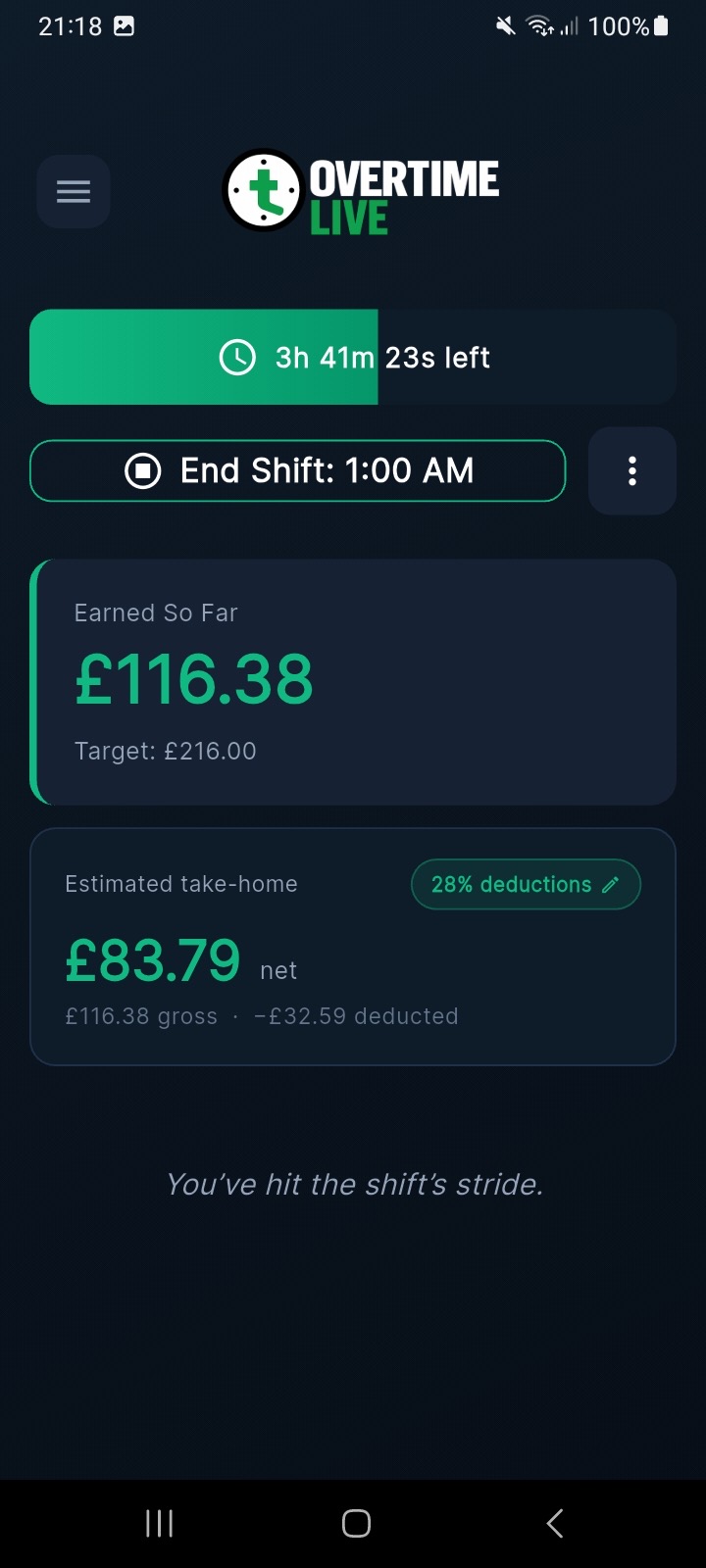
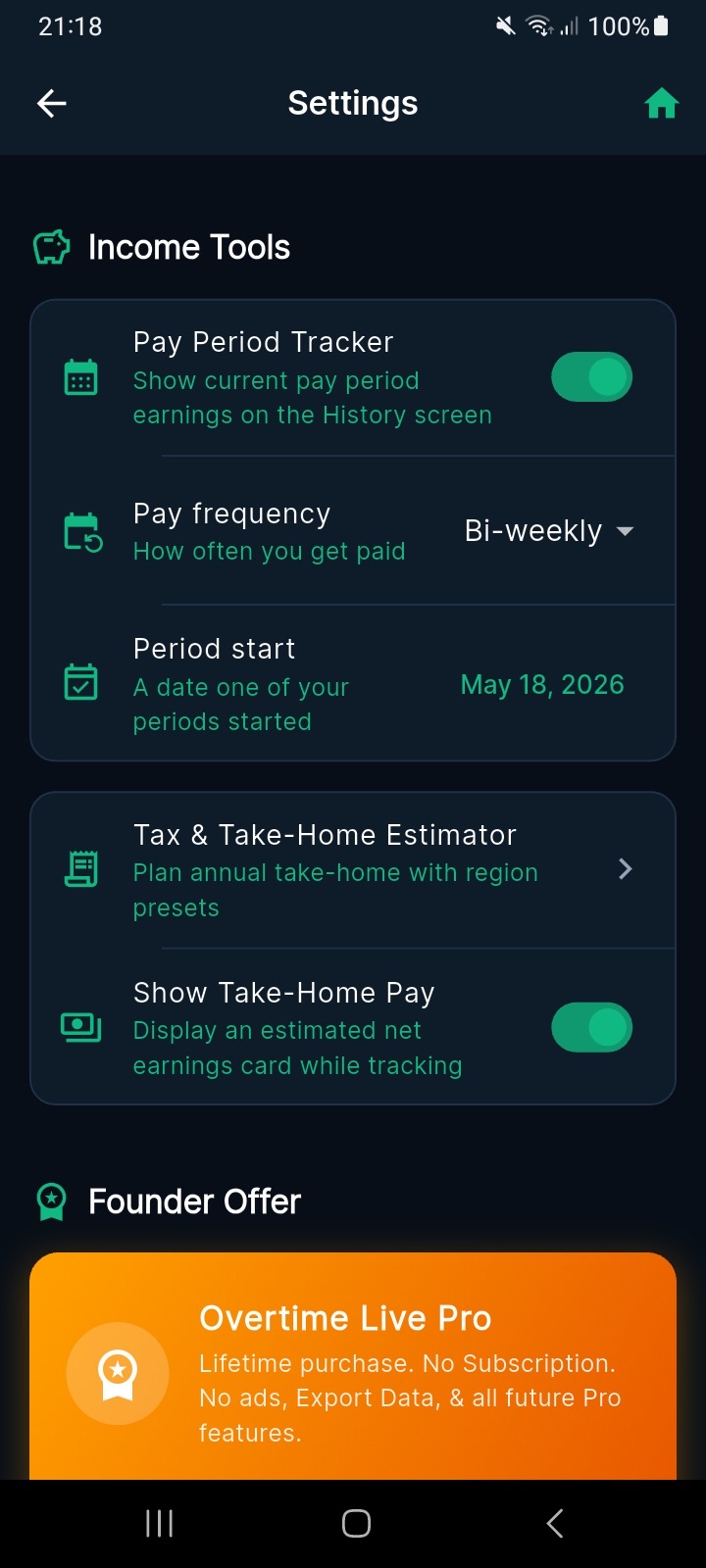
Left: live earnings and take-home estimate mid-shift. Right: the Income Tools settings.
The card updates in real time — every second, alongside your gross earnings. If you're on a night shift watching the clock, you can see both numbers moving together. In the screenshot above, a shift ending at 1 AM with £116.38 earned gives an estimated net of £83.79 after 28% deductions.
That 28% deduction rate isn't a guess you typed in. It's calculated from your Tax & Take-Home Estimator settings — based on your region, your personal allowance, your pension rate, and the annualised projection of what you're earning across all your shifts. As your earnings change over the year, that effective rate adjusts too.
You can tap the deduction rate pill on screen to edit it on the fly if you want to quickly try a different scenario — useful if you're mid-shift and wondering what a different tax year looks like.
Start Tracking What You Actually Take Home
No account. No sign-up. On iOS and Android.
Frequently Asked Questions
What is the Pay Period Tracker in Overtime Live?
How does the Tax and Take-Home Estimator work?
Does the take-home calculation work for NHS staff?
Is the take-home pay figure accurate?
Do the Income Tools work on Android?
Questions or feedback? Reach us at [email protected] or follow @OvertimeLiveApp on X for updates.